Live Blog for Micro-Messaging
Live Blog is an automatically updating browser window that allows users to type a brief note from wherever they are (a traditional browser or mobile device such as an iPhone) which will appear as a highlighted entry within seconds for all users who are monitoring that space. The TeamPage Release 5.0 Proteus skin extends Live blog capabilities to include a Twitter style follow model and much more.
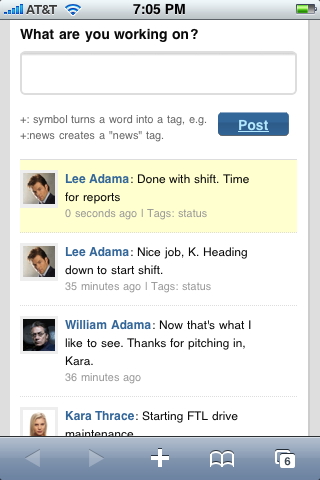
Live Blog makes it simple to share brief notes connecting groups of people. You may already be familiar with these models:
1) Instant posting and response - the Chat or IM model
2) Micro blogging and social messaging - the Twitter or Facebook model
Live Blog uses pure Web browser technology to push what you say to everyone watching a Live Blog window seconds after you post. No client software or Web browser extensions are required.
Conversations you might otherwise have in IM or Twitter can take place securely within a TeamPage context with its rich content, tagging and discussion model. A Live Blog note on a critical issue can easily be tagged and referenced for followup, found in TeamPage search, or disseminated though Traction TeamPage notification channels such as IM, email, email digest or RSS stream.
Traction's Live Blog technology allows enterprise users to:
- Share brief updates to stay in touch securely with customers and colleagues anytime and from anywhere
- Keep in touch with product, sales and support teams while getting work done
- Connect internal teams and development partners, suppliers and customers working on projects that span the globe
- Easily raise and discuss issues that need quick attention
- Use Live Blogs in separate TeamPage spaces to work with individual clients (like a law firm) where privacy is a necessity
- Leverage TeamPage's security, search, comment, social tagging and notification features to power Live Blogs and flag issues for follow-up action
 I18N ERROR: @tsiskin#footer_RSS_Feed